Search
Order the New York Times Best-Seller "How To Be Black"

You Are Here

Baratunde is a politically-active, technology-loving comedian from the future. He co-founded the black political blog, Jack & Jill Politics, served as Director of Digital for The Onion and is a regular guest on Leo Laporte's TWiT. His book, How To Be Black, is a New York Times Best Seller and was published by Harper in February 2012. Basically, he's a smart, funny, extremely handsome dude. >> Full bio.

Join The Email List. Yes, Email

* indicates required

Featured Videos
Twitter!!!!!!!!!!
Social Internet Thingies
Behind The Curtain
Powered by Squarespace
« Need Help With Feedburner + Wordpress. Can't Burn Valid Feed | Main | Headless dog at comedy central »
Sunday
Jun292008

Wordpress is forcing text to wrap around image. Help!

this is what's happening. see how the text and post-footer info is showing up at the top right?


wordpress forces text beside image


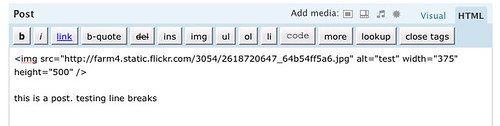
but my code looks like this


my simple image code


any ideas what's going on?


could my theme be forcing this behavior?


PrintView Printer Friendly Version

EmailEmail Article to Friend

Reader Comments (23)

Without actually seeing the code, I think it's the size of the photo and the width of the content column in the theme.

June 29, 2008 | Unregistered CommenterCecily Walker

Without actually seeing the code, I think it's the size of the photo and the width of the content column in the theme.

June 29, 2008 | Unregistered CommenterCecily Walker

I replied on friendfeed but I'll try again here. :) Try adding a line break tag after the photo, or enclosing the text in a paragraph tag.

June 29, 2008 | Unregistered CommenterCecily Walker

I replied on friendfeed but I'll try again here. :) Try adding a line break tag after the photo, or enclosing the text in a paragraph tag.

June 29, 2008 | Unregistered CommenterCecily Walker

Check your stylesheet to see if it is doing a "float: left" on the images.

June 29, 2008 | Unregistered CommenterKenya

Check your stylesheet to see if it is doing a "float: left" on the images.

June 29, 2008 | Unregistered CommenterKenya

Hey Baratunde -

It's in your CSS, get rid of the float:left in this line:
.PostContent img { margin: 0px 10px 10px 0px; float: left; border:solid 1px #495b6b;}

June 29, 2008 | Unregistered CommenterJeff Greco

Hey Baratunde -

It's in your CSS, get rid of the float:left in this line:
.PostContent img { margin: 0px 10px 10px 0px; float: left; border:solid 1px #495b6b;}

June 29, 2008 | Unregistered CommenterJeff Greco

Hey Baratunde -

It's in your CSS, get rid of the float:left in this line:
.PostContent img { margin: 0px 10px 10px 0px; float: left; border:solid 1px #495b6b;}

June 29, 2008 | Unregistered CommenterJeff Greco

greco. thanks! solved

greco. thanks! solved

greco. thanks! solved

You could also clear the postmeta (in your template, single.php and maybe index.php, after the titles and meta info, but before the content) with <div class="clear"></div>

June 30, 2008 | Unregistered CommenterCody McKibben

You could also clear the postmeta (in your template, single.php and maybe index.php, after the titles and meta info, but before the content) with <div class="clear"></div>

June 30, 2008 | Unregistered CommenterCody McKibben

You could also clear the postmeta (in your template, single.php and maybe index.php, after the titles and meta info, but before the content) with <div class="clear"></div>

June 30, 2008 | Unregistered CommenterCody McKibben

AHHH This was bothering me LIKE MAD!! Thanks for posting.

August 6, 2008 | Unregistered Commenterwil reynolds

AHHH This was bothering me LIKE MAD!! Thanks for posting.

August 6, 2008 | Unregistered Commenterwil reynolds

AHHH This was bothering me LIKE MAD!! Thanks for posting.

August 6, 2008 | Unregistered Commenterwil reynolds

TY that worked! I was looking for 2 days and this post here finally helped. It was in my style.css i had to change according to what Jeff Greco said, thanks!

November 12, 2008 | Unregistered Commentertonya

TY that worked! I was looking for 2 days and this post here finally helped. It was in my style.css i had to change according to what Jeff Greco said, thanks!

November 12, 2008 | Unregistered Commentertonya

I usually don�t post on Blogs but ya forced me to, great info.. excellent! � I'll bookmark your site.

April 26, 2010 | Unregistered CommenterDustin Rosiak

PostPost a New Comment

Enter your information below to add a new comment.

My response is on my own website »
Author Email (optional):
Author URL (optional):
Post:
 
Some HTML allowed: <a href="" title=""> <abbr title=""> <acronym title=""> <b> <blockquote cite=""> <code> <em> <i> <strike> <strong>